Odoo offers powerful ways to tailor its ERP system to specific business needs through how to customize Odoo effectively. Whether configuring basic settings or developing advanced features, Odoo customization ensures seamless operations without disrupting core functionality. This guide covers everything from basics to advanced Odoo development for business owners, consultants, and developers.
What Customization Means in Odoo?
Customization in Odoo splits into configuration and true customization. Configuration involves using built-in menus to adjust settings, like user permissions or workflow stages, without code. True Odoo customization modifies the source code or uses tools like Studio to add fields, views, or logic.
Configuration suits simple changes, such as renaming menus or adding dashboard widgets. Customization becomes necessary for unique requirements, like custom fields or integrations, always prioritizing upgrade-safe methods.
Odoo Studio vs Custom Module Development
Odoo Studio provides a no-code drag-and-drop interface for quick changes, ideal for adding fields, modifying views, or creating reports. It stores changes in the database, making it fast for non-developers but limited for complex logic or performance-heavy tasks.
Custom module development offers unlimited flexibility through Python and XML, suitable for backend workflows, APIs, or scalability needs. Use Studio for prototypes or minor UI tweaks; opt for custom code when building integrations or handling high volumes.
| Aspect | Odoo Studio | Custom Development |
| Ease of Use | Drag-and-drop, no code | Requires Python/XML skills |
| Speed | Fast for simple changes | Slower but scalable |
| Limits | Basic logic only | Unlimited features |
| Maintenance | Database-stored, upgrade risks | Version control friendly |
Common Areas for Odoo Customization
Fields, Forms, and Views (XML)
Add custom fields by extending models in Python and inheriting views via XML. Forms and list views use XPath to insert elements precisely, preserving core views.
Workflows and Automation
Server actions trigger Python code on events, like email notifications. Scheduled actions run cron jobs for batch processes, automating approvals or data syncs.
Security and Access Rules
Define groups in XML, then set ACLs in CSV for read/write/create permissions per model. Record rules filter data visibility, e.g., users see only their records.
Reports (QWeb)
QWeb templates customize PDFs. Inherit report views to add logos or calculations, ensuring responsive designs.
Integrations
Expose REST endpoints or webhooks for external syncs, like Shopify or payment gateways. Use controllers for secure API handling.
UI and Website Customization
Modify themes via SCSS assets or Studio for dashboards. Website builder handles pages without code.
Step-by-Step Approach on How to Customize Odoo
Gather Requirements
Document business needs, pain points, and success metrics. Prioritize features impacting revenue or efficiency.
Select Approach
Choose config for basics, Studio for UI, or dev for logic. Assess complexity and team skills.
Set Up Development Environment
Clone Odoo source, add custom addons path in config. Use Odoo.sh or local PostgreSQL for staging.
Build Custom Module
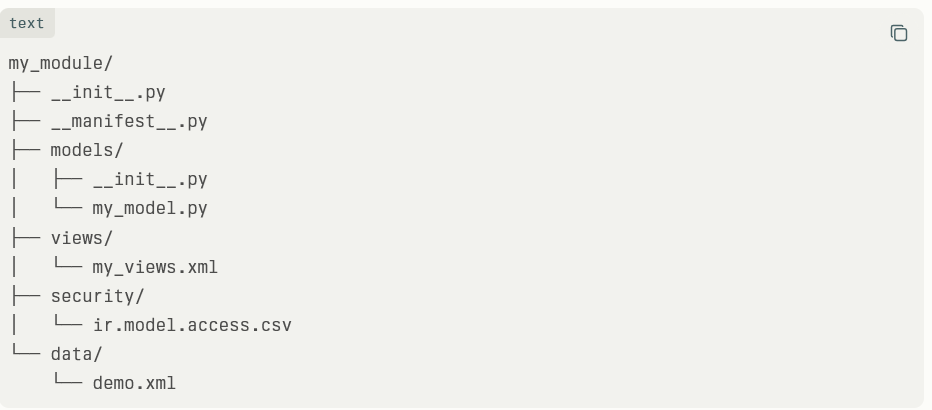
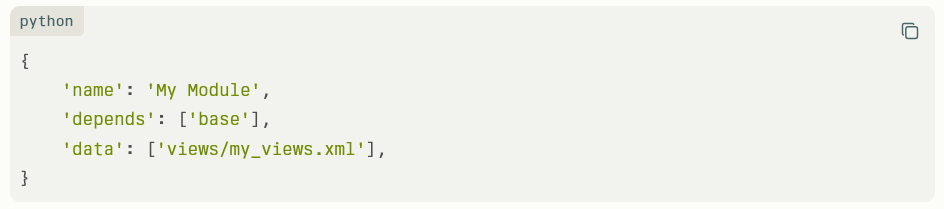
Scaffold via ./odoo-bin scaffold my_module addons. Edit __manifest__.py, models, and views.
Minimal Custom Module Structure:
manifest.py example:
Test Thoroughly
Run unit tests with odoo-bin -u my_module -d db_name. Perform user acceptance testing in staging.
Deploy and Monitor
Push to production via Odoo.sh or rsync. Monitor logs for errors, use metrics for performance.
Maintain and Upgrade
Tag modules by Odoo version. Test upgrades early; use migration scripts for data changes.
Practical Examples
Custom Approval Workflow
Extend purchase.order with approval states. Add server action to notify managers on submit.
Model Extension (Python):
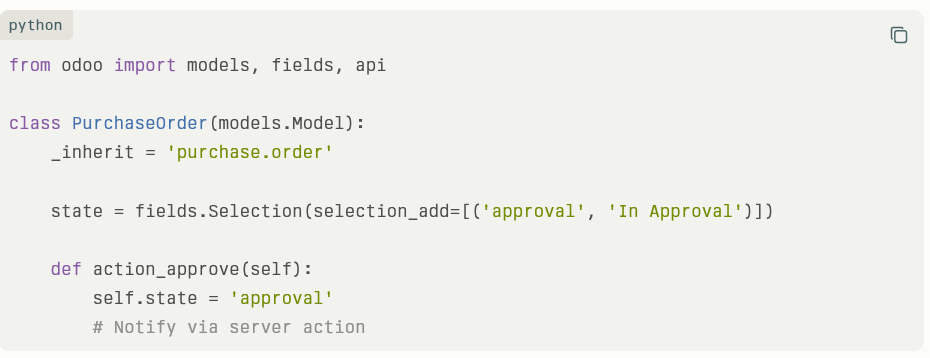
Server action triggers email; record rule limits visibility.
Custom Sales Report
Inherit QWeb template for sales orders. Add company logo and total tax breakdown.
XML View Inheritance Example:
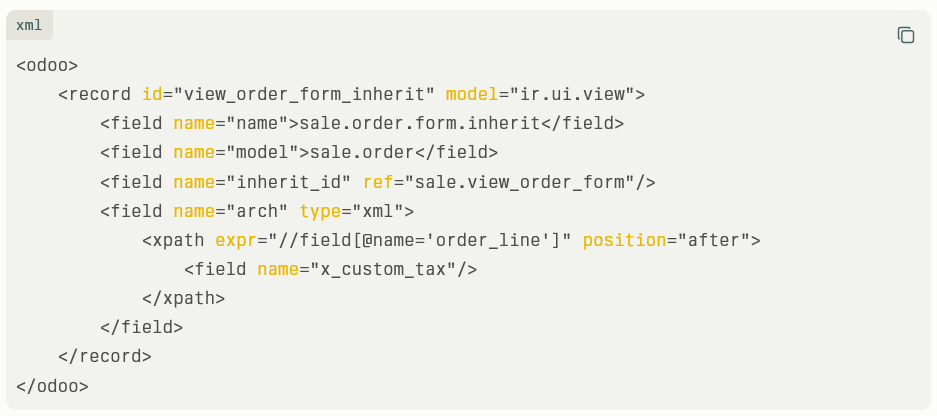
Deploy as module for reusable reports.
Best Practices and Common Pitfalls
Follow Odoo customization best practices: never edit core files; always inherit. Use Git for version control, staging environments, and CI/CD pipelines.
Pitfalls include over-customization, leading to upgrade issues and performance hits from inefficient queries. Document changes, govern access, and profile code.
- Avoid XML soup: Use specific XPath.
- Keep modules lightweight: Split large ones.
- Test multi-company setups.
- Monitor query times post-deploy.